Lifecycle-Wide Tool

Workflow & Approvals in PMWEB

Route every document, recommendation and decision to the right person — automatically. PMWEB's configurable workflow engine enforces your organisation's delegation matrix across procurement, contracts, cost and document management, with full tracking and a complete audit trail.

PMWEB Platform Feature

Every Approval. Fully Controlled.

PMWEB's workflow engine gives capital works organisations a single configurable environment to manage all document routing, review and approval activity — from RFI responses and drawing reviews to change order approvals, invoices and payment certificates. Workflows are built using a drag-and-drop interface and are tied to your delegation matrix, contract values and user roles, so the right information reaches the right decision-makers every time — and every step is recorded.

Routing

Drag-and-Drop Document Routing

Build approval routes visually — no scripting, no IT involvement. PMWEB's workflow designer lets administrators configure routing templates that apply automatically based on document type, value threshold, project phase, or user-defined criteria. Templates are reusable across projects and can be adjusted as governance requirements evolve.
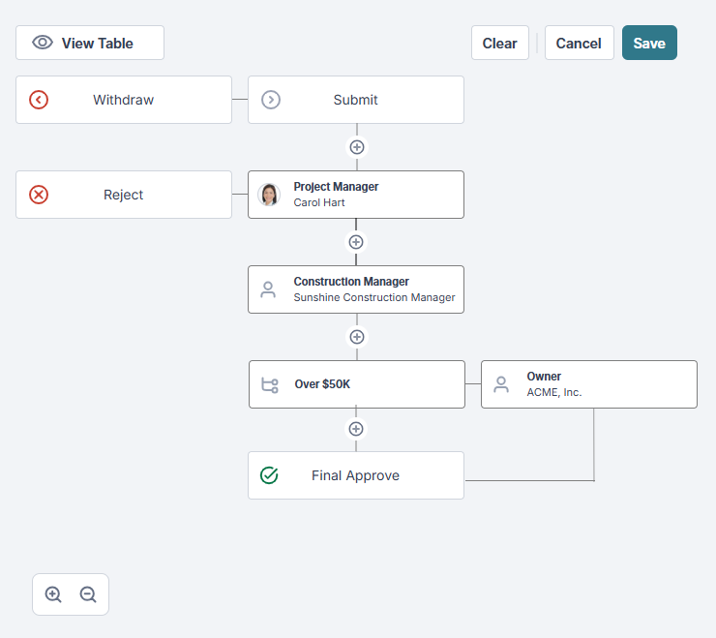
Visual workflow builder
Construct multi-step routing sequences in a drag-and-drop canvas — no configuration files or developer resources required.
Conditional routing rules
Route documents differently based on value, document type, project classification, or custom fields — without maintaining separate workflow templates for every scenario.
Reusable template library
Maintain a library of organisation-approved workflow templates that can be applied consistently across all projects in a program.
Explore all platform features
PMWEB workflow drag-and-drop routing builder workspace
Delegation

Delegated Authority and Value-Based Approval Chains

PMWEB's approval chains respect your organisation's delegation of authority framework — automatically routing approvals to the correct level based on contract value, expenditure type, and project classification. When a delegate is unavailable, options are available to keep approvals moving without manual intervention or offline chasing.
Value threshold triggers
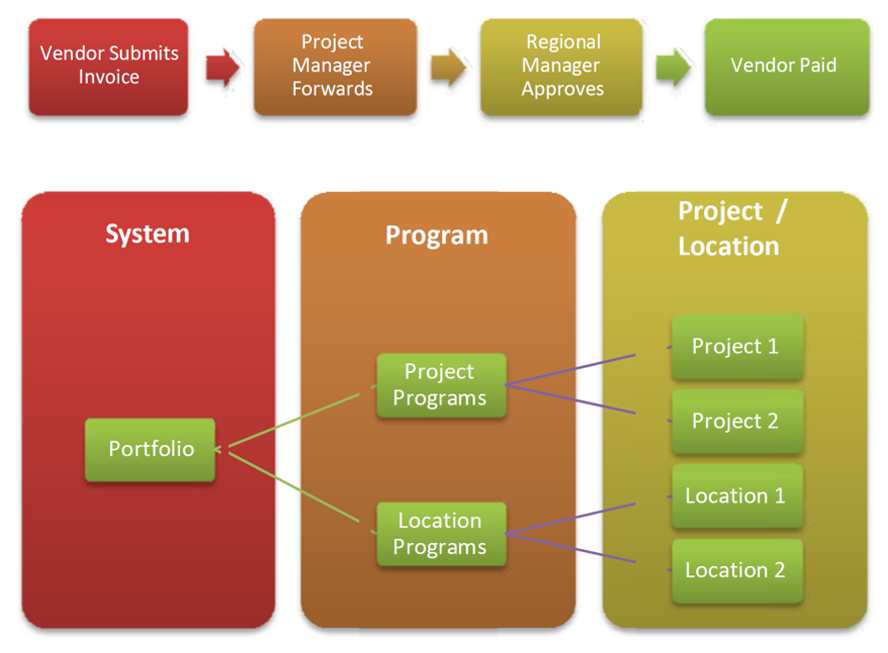
Define approval thresholds by dollar value — requests below $50K route to one level, above $500K route to a different chain, automatically and without manual triage.
Set Workflow at Portfolio (system), Program or Project level
Workflows set at higher levels automatically apply to lower levels – e.g., a Program-level invoice workflow automatically applies to every project in the program – so a change in delegated authority only needs to be applied once, not to each project.
Delegate and acting arrangements
Assign acting delegates during leave or organisational changes — approval chains remain intact and governance-compliant throughout.
Escalation and overdue alerts
Set response time expectations per approval step — overdue items trigger automated escalation notifications to the approver and their nominated manager.
Discuss Your Requirements
PMWEB delegated authority matrix showing value-based approval routing
Audit Trail

Complete Approval History and Audit Compliance

Every workflow action in PMWEB is timestamped and attributed — who received it, when they acted, what they approved or rejected and any comments attached. This record is immutable, reportable and available for internal audit, external audit and dispute resolution without any additional configuration or data extraction.
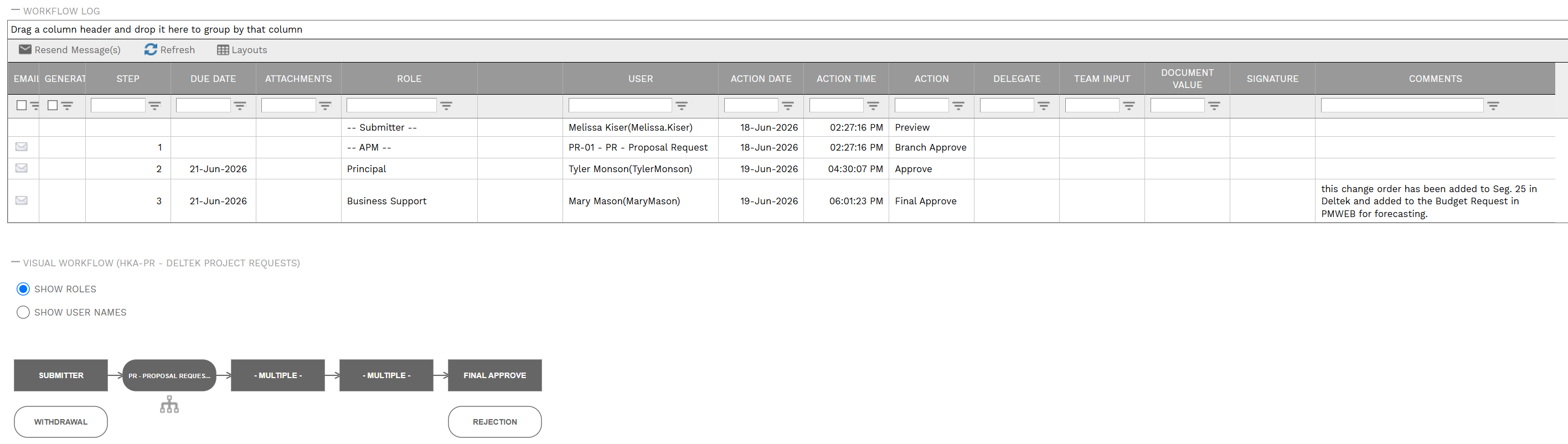
Timestamped approval records
Every approval, rejection and comment is recorded with the date, time and user — creating a complete, immutable history of every decision.
Reportable workflow data
Approval history feeds directly into PMWEB's dashboard and reporting layer — giving program managers visibility of approval velocity, bottlenecks and outstanding items across the portfolio.
Cross-module consistency
The same workflow engine governs approvals across procurement, contracts, cost variations, RFIs and document control — a single audit record for the entire project lifecycle.
Explore all platform features
PMWEB workflow audit trail showing approval history
On the Go

Approve from Anywhere

Approvals do not have to wait for someone to be at their desk. PMWEB's workflow engine reaches approvers wherever they are — with no app to install. PMWEB's responsive design allows clear display on a phone or tablet, from any browser. Decision-makers can review the document, see the approval history and – if the organisation allows – approve or reject on the spot, so the chain keeps moving even when key people are on site or travelling.
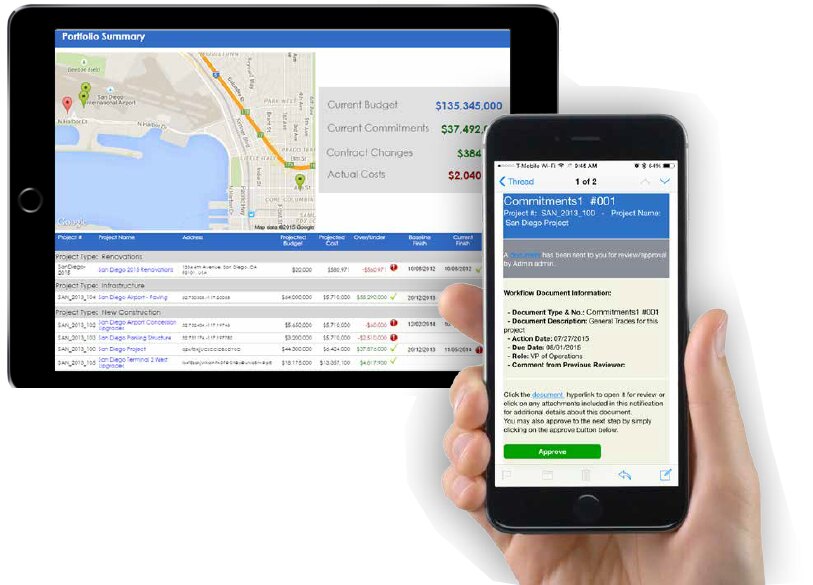
Action approvals on any device
Review and approve documents, recommendations and decisions from a phone, tablet, or laptop — the same workflow engine, on whatever device is to hand.
Option to allow remote approvals
Organisations can decide what workflows can be approved remotely without logging into PMWEB – a remote approval automatically flows back to PMWEB. Typically, additional information is sent where remote approval is enabled – e.g., a .pdf attachment.
No bottleneck when people are away
Approvers on site or travelling can keep the chain moving in real time, so escalations and overdue alerts are the exception rather than the norm.
Same audit trail, every channel
Mobile approvals are recorded in exactly the same immutable history as desktop actions — one consistent record regardless of where the decision was made.
Explore PMWEB Mobility
PMWEB Mobile approval action on a phone or tablet
Platform Features

Other Features in PMWEB

Workflow & Approvals is one of many platform features available across the full Plan, Build and Operate lifecycle in PMWEB.

Make Page Content Placeholder