Flexible Implementation approach

HKA Tech has implemented Portfolio, Program and Project Management solutions for more than 500 Clients — including more than 300 PMWEB implementations since 2011. Our implementation methodologies are proven and can be tailored to not only the specific functionality required by the Client, but also how the Client would like the new system deployed to its end users.

Understanding Client Needs

More than a Decade of Implementation Experience

At HKA Tech we have 15 years' experience implementing PMWEB program/project management systems for hundreds of clients. Over that time we have molded our approach to be the most effective at executing the widespread organizational change that these systems often require. We feel it is why our clients' implementations are so successful year after year.

Tyler Monson
Tyler Monson
Principal, Director of Professional Services
Our Process

A Proven, Synergistic Process

HKA Tech's experience, knowledge, and expertise — coupled with a proven process — is our synergistic approach to help ensure a successful deployment and adoption for our clients. We employ a combination of traditional waterfall and agile methodologies in our project management approach.

Our Implementation Methodology provides our clients with a proven process of successfully deploying software. Our approach provides a standardized method for managing the entire planning, testing and implementation process while building a solid foundation to help ensure a successful deployment and adoption for our clients.

Our implementation methodology incorporates years of hands-on experience with industry-accepted processes and procedures. Our experience has shown that a successful implementation requires two key elements:

Key Element

End User Involvement & Agility

Our experience has shown that a successful implementation requires two key elements:

End User Involvement — We strongly believe in involving end-users of the system immediately and often. By doing this, they quickly begin to understand how the system works and provide intelligent feedback as to how it can be adjusted to better meet their needs. This requirement is met in a couple of ways:

  • The implementation team includes Client operational personnel, because they understand their own needs better than anyone
  • Progressive Piloting - users will begin using the system as soon as possible to test and pilot the configuration and ensure that it will be appropriate

Agility — We have found that it is extremely important for user adoption and satisfaction that the implementation team be able to receive feedback and quickly incorporate that feedback into the system. The best feedback cannot be given until a person is able to actually use an aspect of the system. For this reason, we have added a number of aspects of the Agile approach to conventional Waterfall methodology, to result in a "blended" approach — combining the best elements of both — that we have used successfully on our PMWEB implementations.

Implementation Methodology

Our Four-Stage Process

1

Project Information

  • User Requirements
  • Vision
  • Identify Team and Roles
  • Pre-Kickoff Call
2

Kickoff

  • Feature Roadmap
  • Release Planning
  • Super User Training
  • Sprint Planning
  • Begin 1st Sprint
3

Configuration Sprints

  • Analyze, Design, Configure, Test
  • 1–2 two-hour configuration sessions per week
  • Consultant shows out-of-box features; discovery & gap analysis
  • Action items for next session; testing of configuration
  • End-of-sprint review & planning: demo working configs, log outstanding issues, review backlog, plan next sprint
4

Release

  • End User Training
  • End User Support
Quality Management

Quality Management from Start to Finish

The Quality Management systems of HKA are independently certified to conform with the international Quality Management Standard ISO9001:2015. We have held this certification for more than 15 years, along with certifications for our OHS/WHS and Environmental Management Systems.

The foundations for Quality Management in our implementations are:

  • Scope definition and documentation
  • Deliverables Management
  • Change Management
  • Risk Management
  • Transparent client communication
  • Management meetings
  • Routine reporting

HKA's Quality Management for the Implementation ensures:

  • Process compliance with the Project Management and Implementation Plan
  • Validation of Scope
  • Validation of Changes
  • Documentation updates to reflect changes
  • Verification of Deliverables
  • Lessons Learned duly documented
DNV Management System Certification — ISO 9001, ISO 14001 and ISO 45001
Quick Start

Quick Start Alternative

The HKA "Quick Start" approach takes advantage of PMWEB's comprehensive out-of-the-box functionality. This approach allows the Client the flexibility of an early Go Live by functional area and/or user group(s), followed by an optimised approach to the configuration.

In the final analysis, there is virtually nothing that we do in an implementation that the Client's own personnel cannot do after they have been trained. This is a key feature of PMWEB — it is designed for user configuration, so there is no need to bring back an army of consultants in future if the Client's processes and approaches change over time. The Client can undertake its own configurations as it pursues continuous improvement.

The Quick Start approach suits clients who wish to utilise and learn from PMWEB's functionality and processes developed over almost 20 years of delivering capital works projects — and have the flexibility to adjust their own processes where needed. Other clients have their own ways of delivering projects and require little change to their established processes, forms and records — requiring PMWEB to be configured to exactly align with their delivery approach. Many clients sit in the middle, fixed in some areas for various reasons and flexible in other areas. We have implemented PMWEB under each of these scenarios and enjoy working with Clients to determine the optimum approach for each Client.

More information on HKA Quick Start packages

The Team

Assembling the Team

A successful implementation depends on a well integrated team of both HKA Tech and client staff. The level of involvement by each team member will vary by role and availability but all will be involved at some level. The key roles, split between the Client's team and HKA's team, are:
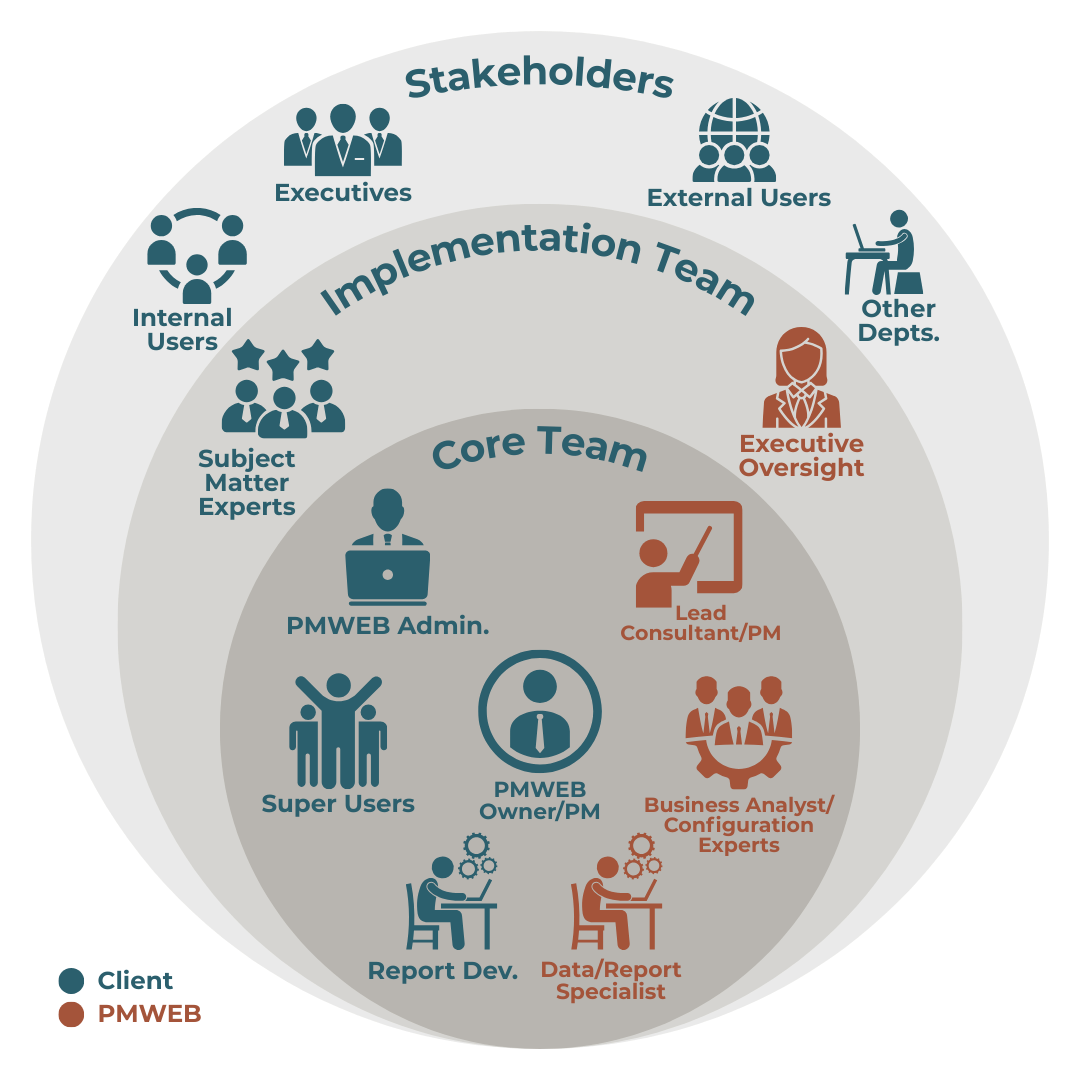
HKA Tech implementation team structure — stakeholders, implementation team and core team
Client's Team Members

PMWEB Owner

This is one of the most important roles for the client organisation. It can be one person or split between a governing committee, a Product Owner and a Client-side Project Manager. The "PMWEB Owner", individually or collectively, manages priorities, budget, stakeholder feedback, testing/acceptance, client resources and establishes the governance hierarchy for communications between the client team and HKA Tech.

PMWEB Administrator

The long term responsibility for maintaining/administering the PMWEB system is the responsibility of the administrator. During implementation they will learn how to configure PMWEB, manage users, identify and manage future upgrades/enhancements and gather user feedback to be presented to the PMWEB Owner / core team.

Super Users

Including a team of super users is critical to both a successful implementation and user adoption. These are typically subject matter experts from within the client organization. During implementation they will become experts in using PMWEB, conduct testing of implemented modules/reports, evangelise/promote PMWEB to other users, conduct/participate in end-user training and collect/provide feedback.

Other key Client roles

Other key client roles include a Product Owner (who typically represents the end users and ensures the project delivers the agreed business benefits); a Client-side Project Manager (working side-by-side with the HKA Project Manager to deliver project success); Client SMEs with in-depth understanding of existing and planned client processes; and change management facilitators, including trainers.

HKA Team Members

HKA Project Director / Requirements Lead

In many implementations, the Project Director / Requirements Lead also serves as Account Manager, reporting to the HKA Partner in Charge and provides executive oversight of key areas such as budget, schedule, deliverables, risks/issues and resourcing. This role includes advice as the Client evaluates PMWEB's out-of-the-box functionality against the level of initial requirements definition and new information from the Client SMEs.

HKA Project Manager / Configuration Lead

The Project Manager has a deep understanding of both PMWEB and best practices in the industry. This role includes guiding the team through the implementation process, leading configuration sessions, managing and coordinating HKA resources, teaching the core team how to use and configure the system and working with the Requirements Lead to help the PMWEB Owner define and prioritise the Feature Backlog.

IT Specialists

HKA experts in PMWEB; MS SQL and MS SQL tools (including SSIS and SSRS); PowerShell; Microsoft PowerBI, Fabric and other tools such as Tableau; and assistive tools. This role is initially filled by HKA Tech, but Client team members can be trained. Roles include creating custom reports, modifying existing reports to meet Client needs and database or integration automations including triggers.

Other HKA key roles

Other HKA key roles include Principal oversight on PMWEB's functional use for Client purposes; an IT Director with oversight of IT roles, responsibilities and resource allocations; and an Executive Sponsor, typically HKA's Partner in Charge, with final authority over all HKA team members.

Breadth of Experience

Experience Across Products & Integrations

Experience with Multiple Products

PMWEB
Oracle Contract Manager / Expedition
Oracle/Skire Unifier
Oracle P6
Trimble Prolog
eBuilder
eDocs
EADoc
Procore

Integration Experience

SAP
Oracle
Timberline
ViewPoint
DB2
ABB Ellipse
eCMS
Epicor
SharePoint
Oracle P6
Microsoft Dynamics
(AX and D365)
Yardi
IBM Maximo
M-Files
LaserFiche
JD Edwards
PeopleSoft
ESRI ArcGIS
HP Desksite
HP Content Manager (TRIM)
Make Page Content Placeholder