
Technical Frequently Asked Questions
1. What are the bandwidth requirements per user?
PMWeb’s zero footprint client access removes the requirement to download installation packages, which reduces the initial high level bandwidth required in other systems that download client software when launching the system.
Broadband speeds are recommended for best user experience - DSL/Cable, Fiber Optic, T1/T3. Recommended minimums are 1Mbps upload and download. This requirement is based on accessing the various modules, running reports and uploading/downloading documents in a typical active session.
In addition, PMWeb has been designed and optimized to deliver excellent response times from screen to screen. The software is built to be true enterprise and with a light footprint. PMWeb uses load-on-demand lists throughout the application and AJAX is used extensively to off-load the data validation and other processing tasks to the client when possible.
2. Does the system support high availability , fail-over and clustering to enhance performance across all tiers?
The software is built to be true enterprise and with a light footprint. PMWeb uses load-on-demand lists throughout the application and AJAX is used extensively to off-load the data validation, etc… to the client when possible. The only limit on the number of users is the hardware configuration used. PMWeb software is also built to support scaling via Network load balancing and SQL clustering and can be fully virtualized and spread across multiple hardware/servers to scale it for a large number of users. PMWeb software can scale up by adding additional resources (CPUs/CPU Cores, memory, etc…) and scale out by using Hardware-based or OS-based network load balancing for the web front-end and by using SQL Server Clustering for the database back-end.
3. Is load balancing supported and implemented in the system?
The application fully supports network load balancing and SQL-Server clustering for both front-end and back-end scalability. PMWeb is built to support scaling via Network load balancing and SQL clustering and can be fully virtualized and spread across multiple hardware/servers to scale it for a large number of users.
4. How many Users and how many transactions per hour can the system handle?
The system can easily handle 3,000-5,000 users with 1,000 concurrent users logged in and actively using the application. A properly configured load-balanced setup can easily handle 70,000-100,000 transactions per hour. The only limitations on concurrent users are the hardware limitations such as CPU, memory and speed of the storage. More details on PMWeb capacity and results of Load Testing
5. Is it possible to do a backup without shutting down the system?
Yes. Standard manual MS SQL backup or scheduled backups occur in the background and do not disrupt the live use of the system.
6. Can you archive and retrieve historical data? Is it possible to do an incremental recovery (i.e. restore a specific table or file)?
Yes, archived databases can be made active (read-only if desired) either directly through the PMWeb interface or via MS SQL Server Reporting Services (SSRS). SSRS reports are an integrated feature of PMWeb and can run reports on both live production data and archived data all from the same interface. Incremental recovery is no problem, using standard MS SQL administrative functionality.
7. Does PMWeb work with Citrix?
Yes - PMWeb is 100% web based and does not require Citrix. If users are required to use Citrix for their desktop environments, then they can simply launch a browser in the Citrix session and access PMWeb with no impact on that Citrix session.
8. How does PMWeb handle business rules?
Business rules are handled through conditional APM and workflow rules and can be created via a GUI-based interface with drag-and-drop. The rules are stored in the database and can be edited in the application or using standard MSSQL database tools.
9. What databases and versions are supported by the solution? Are there any special collation settings?
MS SQL 2008 R2 Standard
MS SQL 2012 R2 Standard
MS SQL 2014 R2 Standard
Also check for latest details. PMWeb on MS SQL 2016 has been under evaluation.
Collation must be SQL_Latin1_General_CP1_CI_AS. Analysis Services collation must match
10. In what development language is PMWeb written?
The software is written for the .Net Framework with extensive use of AJAX. The languages used are industry-standard VB.net, C#, Javascript and HTML5.
11. How does PMWeb manage User access? Do you support Single Sign-on (SSO)?
PMWeb provides built-in identity management including configurable password expiration; and history and complexity settings that can be expanded with Active Directory/LDAP integration and/or SAML support.
Active Directory (AD) authentication can be achieved with PMWeb’s LDAP Integration utility. This utility allows for AD users to be integrated into PMWeb’s login page thus activating single sign-on (SSO) functionality.
PMWeb similarly supports the OASIS-ratified SAML 2.0 standard.
PMWeb’s “out of the box” functionality includes an extensive security module which limits what actions each user or user group can perform. Security levels can be set for individuals or for various user groups by combinations of:
- System – Program – Project
- Feature (view or no view)
- Record (Add, View, Delete, Update)
- Field (view, update).
The security is also tied to the Document Manager Folders where users can be limited on whether they can Upload, View, Redline, etc. individual folders.
A single user can maintain multiple roles, to allow for functional needs, hierarchy, or matrix organizational roles. This can be achieved at both user security level, where the user can be assigned to multiple groups with differing access permissions; and in all Workflows, where a user’s workflow roles can be multiple at all levels.
12. How do you set up the system to ensure data security?
Typically a 2-layer firewall setup (hardware/ software) with anti-virus/anti-spam/and intrusion detection on both layers. The application is forced to use SSL transport for all communications and is only web-facing via port 443 including the Integration Manager web services. In addition, SSL / IPSec VPNs and URL/IP authentication can be used for additional security if desired.
Data is encrypted in transit (SSL) and at-rest (backups /etc (AES/SHA)). Files/documents are stored securely inside the SQL database for additional security.
View further information on PMWeb security
13. What Ports are used for the SQL Server set-up?
SQL is typically installed using the default instance with all the default ports. If SQL is installed with named instances you can change/specify the ports according to which items are installed and to be used for that database - e.g.
SQL Server: 1433
SQL Browser: 1434
SQL Analysis Services: 2382
PMWeb & SQL Reporting Services: 80 and/or 443
The only required ports to run PMWeb are port 1433, 80 and/or 443.
14. Is there support for Enterprise Service Bus (ESB) or middleware technologies?
The application is entirely self-contained. Integration uses Windows Web Services to export/import files. The services use HTTP/HTTPS and SOAP. In addition to PMWeb's Integration Manager, the PMWeb API also facilitates data exchange and is enables for both SOAP and REST. PMWeb has been integrated in the past with a number of middleware solutions, including JBOSS and Dell Boomi.
15. With what email system does PMWeb integrate?
PMWeb uses industry standards for email system integration. For outbound emails, PMWeb integrates with SMTP Servers, allowing for options to change the port, set as asynchronous, the outbound email address, authentication credentials and enabling of SSL. For inbound emails, PMWeb uses POP3 with options to change Port, enable SSL and allocated project for different email addresses.
16. Is virtualization supported?
Yes. VM Ware, Microsoft Hyper-V and Xen have all been tested and are used in production PMWeb environments.
17. Are there any solution limitations with implementing network segmentation, multiple DMZ tiers, VLAN's and network appliances such as SSL / XML acceleration or network load balancing?
No, the application is built with GUID keys and it does not have any such limitations. Also, it is fully web based and uses only ports 80/443 so it fully supports network load balancing via hardware/software and SSL/XML acceleration.
18. How do you handle system testing?
Third party specialists can be engaged to perform network penetration tests and application vulnerability testing. The tools they use are nmap, metasploit pro, skipfish, etc.. This testing is typically performed quarterly and with every major release of the software.
Load and performance testing is also performed with software called LoadComplete and a distributed cloud setup.
View information on a recent load test of the PMWeb application delivery chain
Application / usability testing is done via dedicated testing staff, IT support team staff, and automation tools such as TestComplete, Telerik Test Studio, and Microsoft Visual Studio Test Professional.
In virtualised configurations, workload monitoring is done with standard tools for the VMware infrastructure. Thresholds and alerts are set and when reached, additional hardware resources are added promptly.
19. What are the architectural elements that provide isolation between transactional processing and reporting requirements, thereby reducing any impact of report generation on online transactional processing?
Reports are run mostly in SSRS (SQL Server Reporting Services) and can be run on a separate server or cluster of servers. In addition, if further enhancement is required, you can create a separate SQL database for reporting and keep the data updated using either replication or log shipping.
20. Does the Data store allow for record locking and conflict resolution?
The Data store is fully normalized and built with relationship-enforcement. In addition the business logic uses transactions for record updates and deletions. The transactions can be rolled back in case of interruption to ensure data integrity.
21. Which backup products are supported?
Both transactional data and file storage is stored in SQL Server databases. You can use the SQL server backup facilities or other programs such as netbackup or Idera SQL Backup or SQL agents for backup exec and Acronis products.
22. Are credentials stored in a secure format?
Passwords are encrypted using SHA-2 256-bit encryption.
23. What provisions are there for maintaining security across firewalls, including use of secure protocols?
The application is zero-footprint and does not require any plugins such as ActiveX, Java or Silverlight, etc… All components including the viewer, etc.. run server-side. The only port that needs to be open through the firewall is port 443 for SSL. In addition, extra security can be obtained by using IPSec or SSL VPN, URL-authentication and IP-authentication.
24. How accurate are PMWeb's calculations?
PMWeb uses SSRS for Business Intelligence (BI) reporting. This is one of the most advanced reporting engines available on the market, in the “top 3” globally for Business Intelligence and Analytics Platforms - Gartner Report, February 2019. All currency values and unit values are stored in the database to 5 decimal points to ensure accurate calculations (i.e. eliminate rounding errors) in reports and within the system itself.
In order to produce “data accuracy in reports” in any business process, defined standards must first be set to produce the desired output (i.e. reports). Our standard process is to first determine the key performance indicators and other analytics desired by subject matter experts and other stakeholders. Secondly, we work backwards to determine the data entry required to produce the desired report and dashboards. Setting of required fields and reviews using PMWeb Visual Workflow provides additional standards and cross-checking data before a record or document is approved. Ultimately, service levels are determined by multiple factors:
- the type of business process
- the standards configured to conform to the accepted business practices
- the individual(s) performing the work.
25. How accurate are PMWeb's GIS locations?
PMWeb captures latitude/longitude coordinates to 14 decimal places. Only 7 decimal places are required for 10cm accuracy (6 decimal places is 11.08cm accurate).
26. How does the Active Directory integration work?
PMWeb's LDAP toolkit item is required. PMWeb uses an Active Directory Server Account to connect to AD and obtain a list of users:
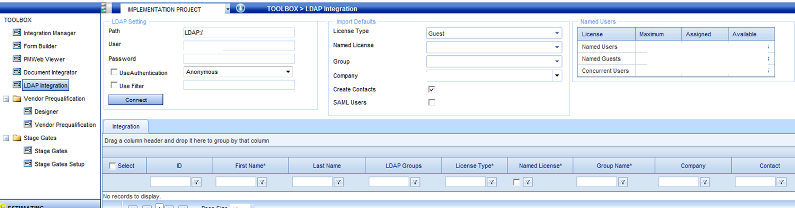
Once connected, you can see the list of the AD users. Once the relevant users are selected and Licence Type and Group Name chosen, the users can be imported to PMWeb. They will then appear under "Define User" in Security section.
The imported users are stored in the PMWeb database. A "placeholder account" is imported, stored in the database and used for setting up permissions, security, workflow, etc.
Once the AD/LDAP user is assigned to a security group and subsequently this user tries to login to PMWeb, they are authenticated against AD/LDAP every time they try to login. The User information and the User's password are not stored in PMWeb.
There is currently no automatic syncing between PMWeb and the source AD system - however, due to the real-time authentication, if a user is removed or disabled from AD/LDAP, that user cannot log in and will receive an error message saying 'Invalid Login'.
Note that In the setup screen for LDAP user imports, a user id and password (admin) are required to “import” the users. This is only used to connect to LDAP and bring in the users and metadata to fill the grid. The user must be a registered Admin user and the information is only used once.
27. In Portfolio > Setup > Security > Define Users, there are a couple of fields we need to understand: LDAP Auth and SAML User - what value should be selected for the former and what's the implication of ticking the "SAML User" checkbox for the latter?
LDAP is currently for real-time LDAP/AD based authentication only.
SAML is for full Single Sign-On
functionality. If a user is SAML-based he can only login using the SAML URL for the application and all the trust relationships and supporting X.509 certificates must be installed and
configured correctly.
SAML setup is fairly straightforward and requires a trust relationship based on WS-Federation. Multiple URLs for SAML can be used by PMWeb in order to allow logins by several federation
providers.
Also, the users for authentication can come from multiple AD/LDAP directories.
28. We've just finished a successful upgrade of PMWeb to the latest version. Now there are a number of strange and unexpected buttons appearing - what's going on?
PMWeb Support typically recommends clearing of the browser cache to correct strange issues after an upgrade. If you do this, you should no longer see any strange appearances of screens or buttons.
Be aware that if you are logged in with your own Gmail accounts for Google, you may only want to clear your own local computer data and not account data.
For Chrome, you can find this under the Settings > History option.
For Microsoft Internet Explorer under Tools > Internet Options > Browsing History > Delete.
Please close the browser window after clearing this.
29. We're considering a move from Primavera Contract Manager to PMWeb but have a great deal of data in our existing PCM system that would need to be moved into PMWeb. What are our options?
We released a fixed-price data migration package in October 2016 that provides a baseline service for this purpose. There can be many variables, however, because PCM has been around for a long time in its various versions. Many clients have developed UDFs (User Defined Fields) and other specific configurations over time that will require analysis before an estimate can be confirmed. The base package provides a firm arrangement that can then be reviewed based on any variations to the base case assumptions. Read more....
30. What file types can be used with the PMWeb Viewer?
Current types are jpg, gif, bmp, jpeg, png, pdf, dwfx and dwf.
31. Does PMWeb support electronic signatures?
PMWeb allows the insertion of signature images to records. It also supports electronic signatures with encryption using DocuSign as an optional approval step in Worlflow. You can also paste in external links and links to other electronic signature documents (SharePoint, Adobe etc). This allows encrypted signatures to be incorporated in PMWeb records in addition to or in substitution for an electronic signature image if the client does not want to use DocuSign. PMWeb integration with DocusSgn was released in version 6.1 in November 2019. There is no additional cost for the DocuSign integration, but clients must still pay whatever fees DocuSign itself requires for its use.
32. What is needed for PMWeb's SAML integration?
Client must have a supported Identity Provider compatible with SAML 2.0 with SHA-1 encryption.
PMWeb’s SAML implementation is compatible with ADFS 2.0 , 3.0 and Shibboleth Identity Providers using SHA-1 (ADFS is recommended).
Other identity providers can be supported but may require additional configuration at an additional charge.
Users created within PMWeb must have a username and email address that matches the SAMAccountname and email address being passed in SAML authentication. Multi-Factor Authentication would require additional configuration at an additional charge.
Configuration changes due to updates to SAML or encryption after the initial implementation can be performed at additional costs.